
The screen they work in, not one they visit.
Relationship managers (RMs) open this platform first thing and close it last. The brief was to rebuild the RM-facing side of it for a wealth management desk.
The old layout was organised around the data.
I organised the new one around the workday.
There are no invented numbers on this page. The decisions are the story.
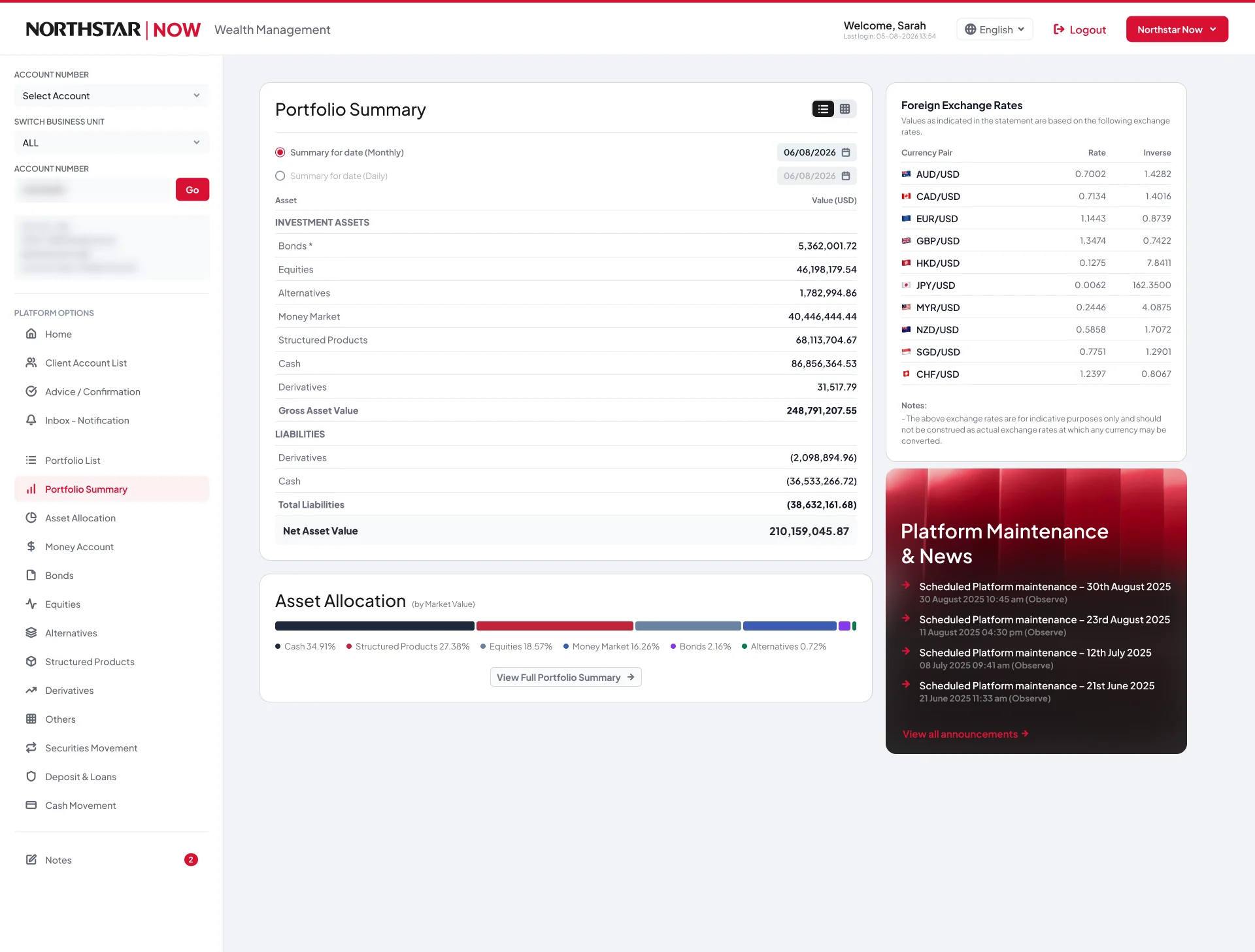
Six screens and one account.
- Screens I saw
- 6, over a live screen share
- Accounts I saw
- 1
- Documentation
- None
- Analytics
- None
- Product context
- None
- Domain knowledge
- None. On day one I couldn’t have defined a fixed income product.
That last row matters, because the findings below came out of the instruments, not the interface.
It followed the data model, not the day.
The things an RM checks first sat at the same visual weight as the things they rarely touch. But the sharper version of the problem only showed up once I read the account rather than the screen.
What the data said that the screen didn’t.
All four can be worked out from data the platform already held. None of them needed a new data feed.
And what was wrong on the surface.
That last one isn’t a design opinion. A profit-and-loss column was headed in dollars and filled in yen.
Real constraints, and a real clock.
- 4 days, start to finish.
- About 40 minutes with the live product, over a screen share. No hands-on access.
- No real users, so no interviews and no usability testing.
- A test environment, so some content was stale or placeholder. I noted it rather than designing around it.
- Real banking data can’t be published, so the client name is changed and account details are blurred.
In the order it happened.
1. Read the data before the interface.
Before touching the layout, I went through the actual portfolio behind the screens. The four findings above came out of that, not out of looking at the UI.
It also showed which asset classes the interface was failing. Structured products, fixed income and derivatives had all inherited the equity column set, which is why those screens looked empty.
2. Audited the hierarchy.
I sorted everything into two buckets: what an RM checks first, and what they rarely touch. Without users to ask, this was the closest I could get to their day. I leaned on how wealth desks work, and said so, rather than pretending otherwise.
That gave me 15 findings, ranked by what they cost the user rather than by how easy they were to fix.
3. Reorganised around the workday.
Density and grouping now follow the daily workflow, not the account structure. Alerts, drift and upcoming actions moved up to where the first glance lands. The rarely used things moved down, not out. Nothing got deleted just to look tidy.
4. Kept the table dense, on purpose.
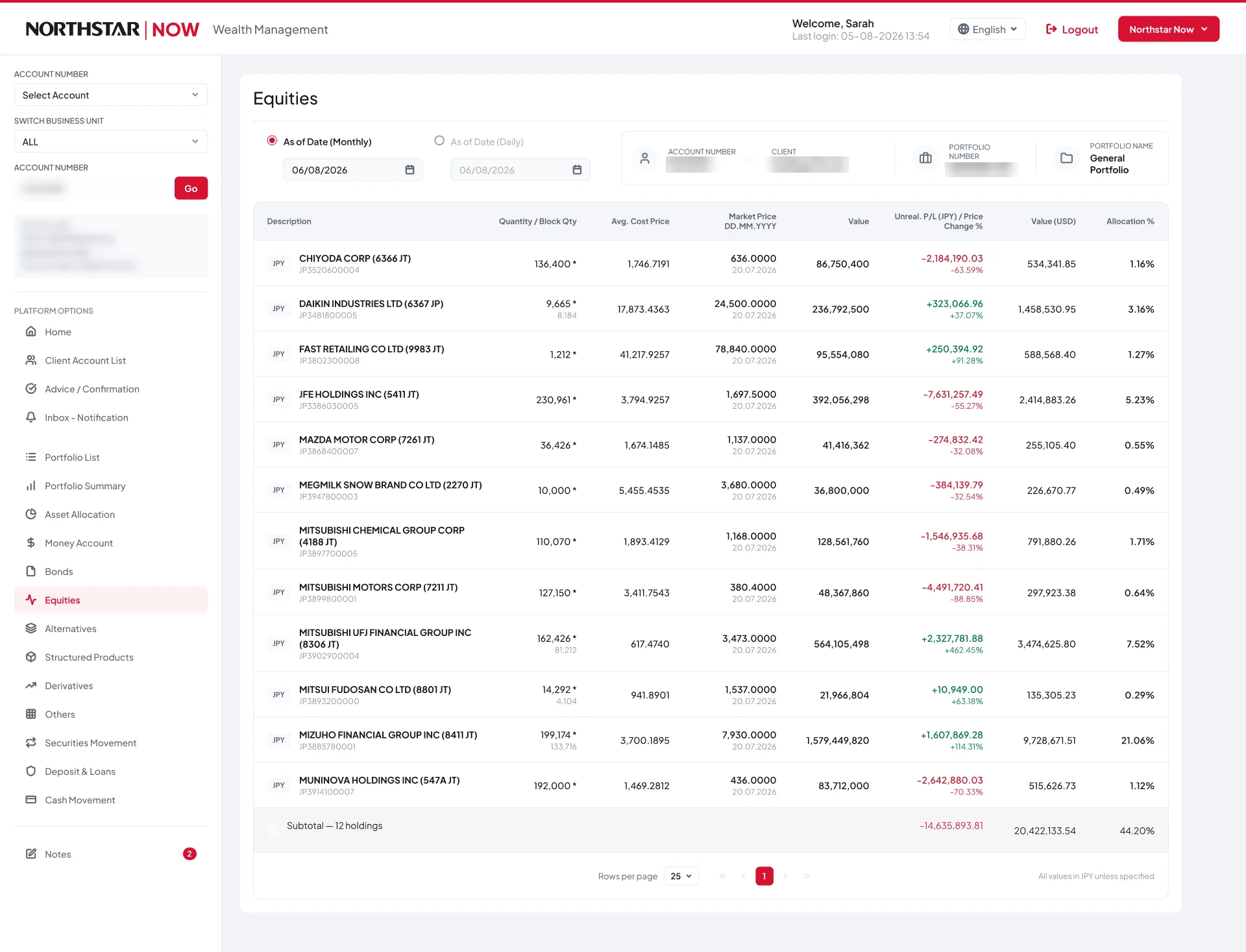
The obvious move on a cramped data grid is to add whitespace. I didn’t. An RM comparing 38 positions wants them all on screen at once. Halving the rows would have made the tool worse while making the screenshot better.
Same row height, same column count. What changed was alignment, number formatting, one value per cell instead of two, and a grid that sorts, filters and totals.
The grid wasn’t too dense. It was badly ordered.

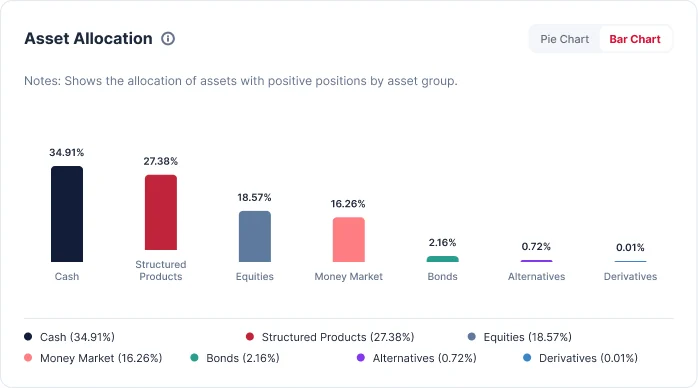
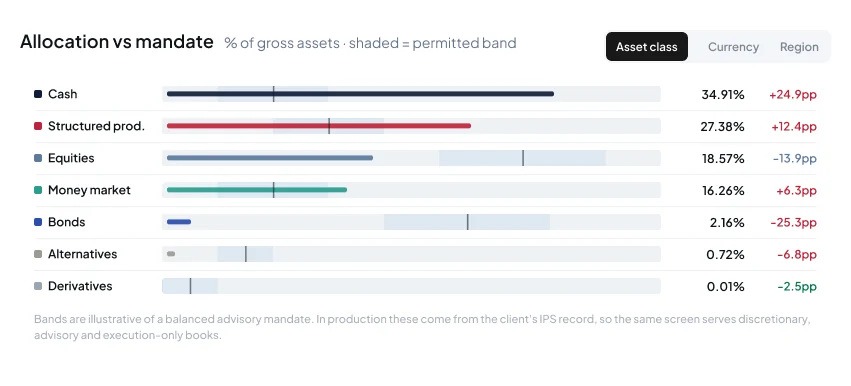
5. Replaced the pie chart with a sorted bar.
A pie answers “what is the mix”, which the RM already knows. A sorted bar answers “what is out of line”, which is the reason they opened the screen.
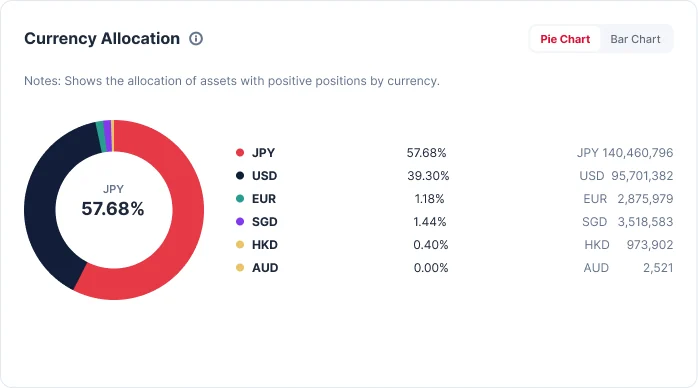
The currency chart kept a circular form, but it leads with the number itself, because that one figure was the largest unhedged risk in the account.
6. Added one screen, and only one.
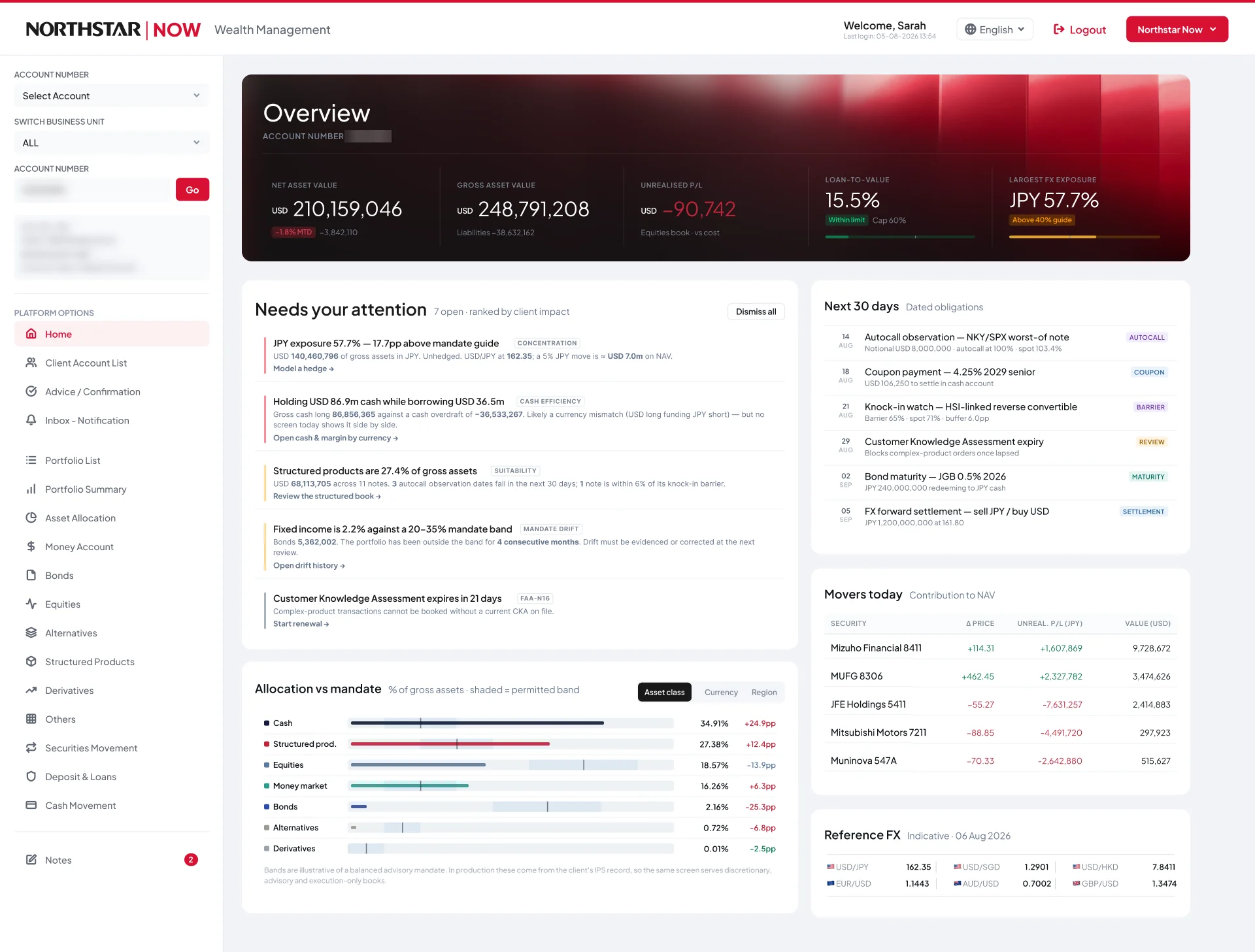
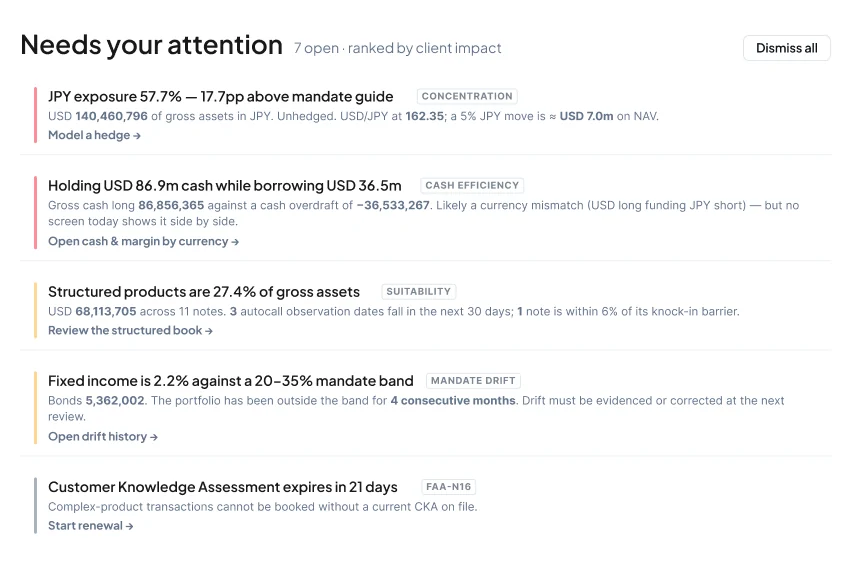
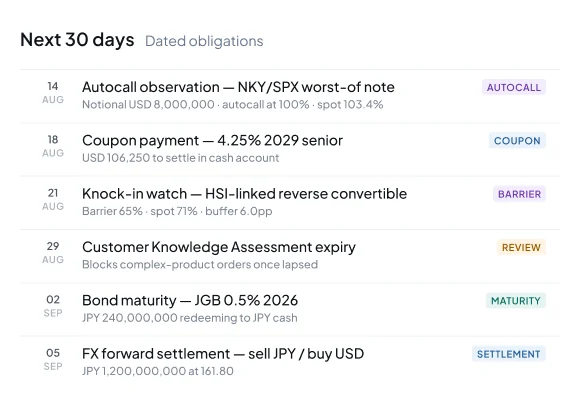
Every existing screen was about a single client. Nothing answered “which of my clients needs me this morning?” So I added an Overview, built entirely from data the platform already holds.
Everything else stayed where it was. I didn’t want to move things that hundreds of trained people already know how to find, on the strength of four days and no user contact.

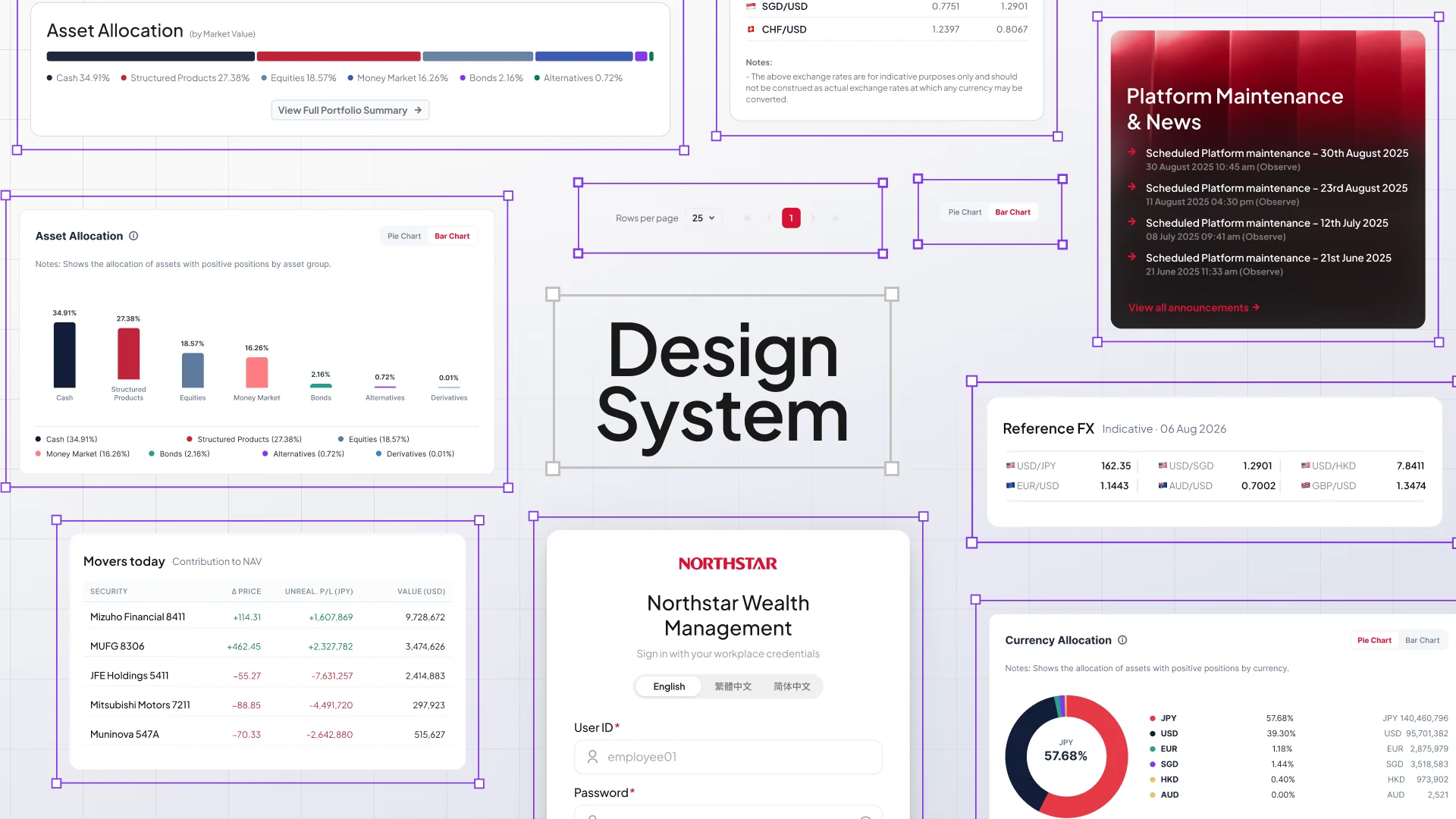
Taking inventory first.
The product had no linked text styles or published tokens. So before restyling anything, I inventoried what was actually on screen: type roles, spacing, colour and gradients, with usage names inferred from where each one appeared. The new components were built from that.
TypeTwo families, two jobs.
Plus Jakarta SansPrimary UI
Aa Bb 0123456789
Ag 09Regular · 400Ag 09Medium · 500Ag 09SemiBold · 600Ag 09Bold · 700
Navigation, headings, controls, financial tables and dashboard metrics.
InterChart support
Aa Bb 0123456789
Ag 09Regular · 400Ag 09Medium · 500Ag 09SemiBold · 600Ag 09Bold · 700
Inside charts, allocation detail, legends and analytical notes. Never a second UI family.
Also recurring: 12 Medium for account metadata, 11 Bold for currency tags such as JPY.
Net asset value210,159,046
Gross asset value248,791,208
Unrealised P/L−90,742
Loan-to-value15.5%
Dashboard valueThe tight leading is kept to single-line metrics. It isn't a default for multiline text.
Metric kickerDashboard table headings share it with +0.525px tracking, separate from the 12px Bold table headings.
Exchange-rate data0.7002 / 1.4282
Emphasised data86,750,400 / 1.16%
Allocation labelsCash / 34.91%
USD 140,460,796 of gross assets in JPY. Unhedged. USD/JPY at 162.35; a 5% JPY move is ≈ USD 7.0m on NAV.
Inline analytical emphasisInter 11.5 · Regular 400 + Bold 700 · 16.68px line height · 0 trackingContextual treatments, kept out of the core scale 7 styles
The 18.13px leading on 18px headings, the −5% tracked 27px value and the fractional sign-in sizes all belong to their source screen. I kept them as measured instead of rounding them into the scale.
SpaceMeasured, not rounded.
2px
Metadata text stacks6px
Metric value / unit8px
Chart legends / bars10px
Title / subtitle stacks13px
Equities cell gaps16px
Status icon / text20px
Chart sections, hero
Gap isn't padding
Enlarged 3×. Padding runs edge to content; a gap runs item to item.
Make the smallest distances visible
Enlarged 4×. Bars are text-layer bounds. A 2px metadata gap stays 2px; it isn't rounded up.
Older and scaled measurements, kept separate 11 values
Fractional values come from older, scaled screens. They stay with their source instead of stretching the core scale. 0px is an intentional flush layout, not a spacing step.
ColourGrouped by job, not by hue.
Brand, surfaces & text
Supporting surfaces
Borders & outlines
Close neutral variants across iterations. Match the source component instead of treating them as aliases.
Text
Positive performance
+1,607,869#0B7A4B30% tint in the dark heroNegative performance
−7,631,257#C0243A30% tint in the dark heroWarning / above guide
Above 40% guide#E0A030#9A5B00 at 40% in the dark heroDark hero support & attention rails
Event tags
Allocation chart categories
Earlier chart palette
From older asset and currency charts. Kept apart from the modern palette and the status colours.
GradientsOverlays, not a red scale.
Black scrim · linear
90% on the dashboard · 51% on login
0% → #000000 at 0α · 100% → #000000 at 100α
Charcoal fade · source-specific
70% on the dashboard ellipse · 90% on the older portfolio
64.11% → #1A1A1A at 100α · 100% → #1A1A1A at 0α. The angle here is indicative; each layer had its own rotation.
Login ambient grey · radial
24% paint opacity
0% → #717784 at 100α · 100% → #717784 at 0α, on the login pattern stroke.
Login button sheen · stroke
100% paint opacity
0% → #FFFFFF at 12α · 100% → #FFFFFF at 0α, on a 1.23px stroke over #0E1419.

Image + native overlays
The architecture supplies the red.
The dashboard and login heroes are artwork with native scrims on top. No red-to-black stops were measured, so none are invented here.
Observed, not prescribed: role names are inferred from use, measurements are kept as found, and older or scaled values stay with their source.
No users means no validation.
I can’t say this tested better, because I never tested it. The whole redesign rests on assumptions about how RMs work. They’re reasoned assumptions, but they’re assumptions.
There are no impact metrics here, on purpose. Everything above is what I found or what I built. None of it is what happened next, because nothing happened next. Making a number up would undo the rest of the page.
How I’d have measured it.
Since I can’t show results, this is what I’d have baselined before shipping anything:
Time to answer
Six questions clients actually ask, timed on the old build and the new one. The more telling number is how many of them mean leaving the platform at all.
Off-platform work
What RMs currently rebuild in Excel, and how often. Spreadsheets retired is the honest measure of whether the tool does its job.
Risk latency
The time between a limit being breached and the RM knowing about it.
Task confidence
Rated after each task. When a wrong number can reach a client, being sure matters more than being quick.
Put it in front of RMs.
- Watch where they look first.
- Check my “checked first vs rarely touched” sort against how they really work. I expect to be wrong about a few of them.
- Find out what the two undocumented columns actually mean. I designed around them rather than removing them, but I was guessing.
Looking back.
Sorting by workflow instead of by data sounds obvious in a sentence. It took longer than a sentence to get right.
The strongest findings came from reading the portfolio, not the interface. I’d start there every time now.
Four days is enough to make real decisions. It isn’t enough to prove them.